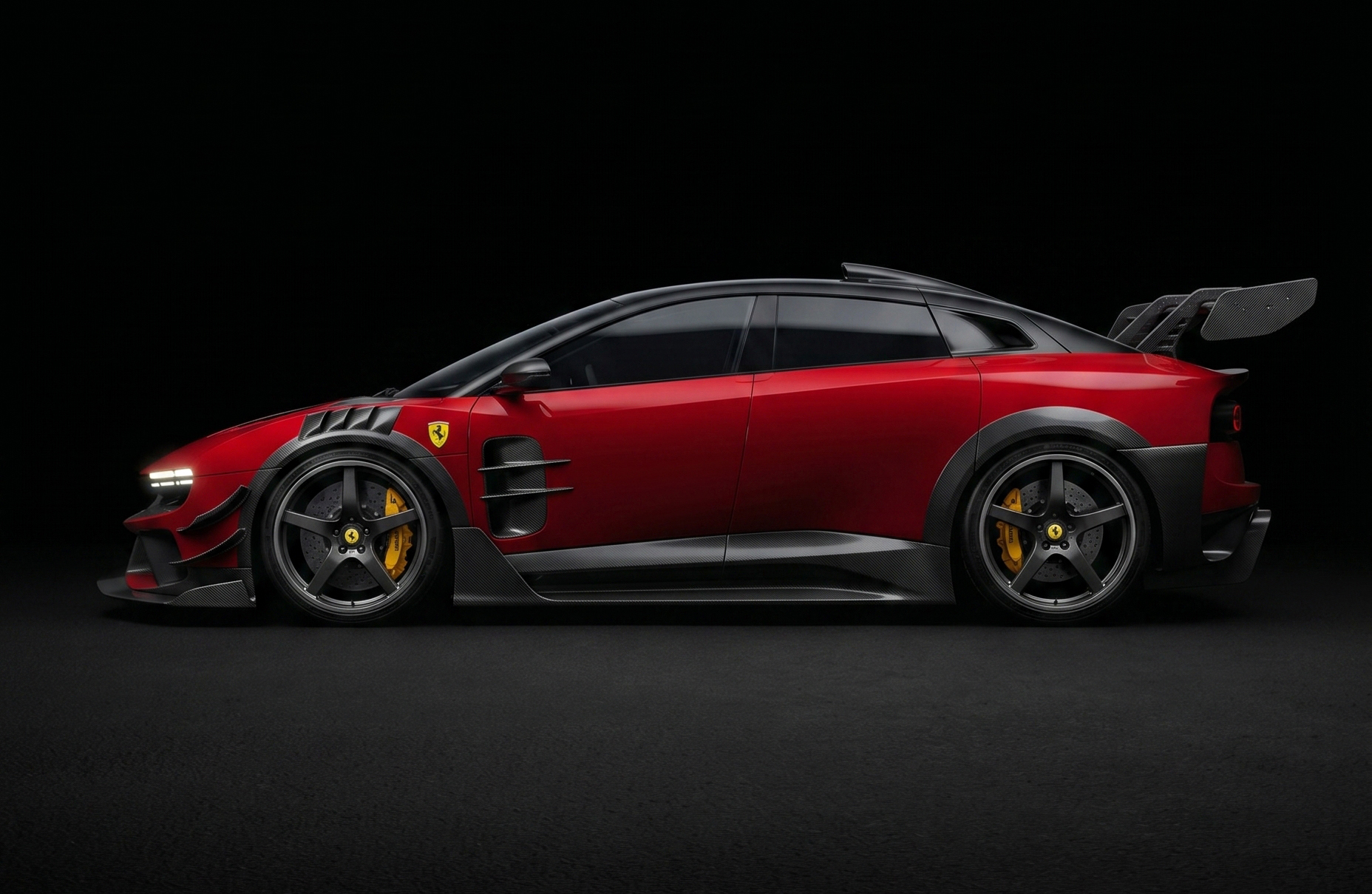
Drop in a photo of any car and turn it into a full widebody supercar — carbon splitters, race stance, GT wing, the works — without changing a single thing about the original scene. Same environment, same lighting, same angle. Only the car gets the upgrade.
An image-to-image transformation that takes any car photo — a daily driver, a parked sedan, an old hatchback, a press shot of a Ferrari — and rebuilds it as a full widebody race-ready supercar without touching anything else in the frame. The car gets extended fenders, carbon splitters, a GT wing, lowered race stance, sharper headlights, performance wheels — but the environment, lighting, reflections, camera angle, and the car's position stay locked exactly as they were. The result feels like the car always lived there, just upgraded.
The Workflow
THREE STEPS
01
Setup · Open The Model
GO TO NANO BANANA 2
Open your preferred platform with access to the Nano Banana 2 image model. It's the model behind this upgrade — it nails image-to-image transformations where you need to change a specific subject while keeping the environment, lighting, and camera locked. Pick the platform you already use (Higgsfield, fal.ai, or any AI studio that hosts Nano Banana 2) and start a fresh image edit.
Open a platform with Nano Banana 2
Start a new image edit / generation
Make sure image-to-image is enabled
02
Input · Any Car Photo
UPLOAD A CAR IMAGE
Upload any car photo as the base image. Literally any car — a daily driver in a driveway, a sedan in a parking lot, an old hatchback on the street, or a clean press shot like the Ferrari in this guide's hero. The prompt is written to upgrade whatever car you feed it while preserving the scene exactly, so resolution and framing are more important than the car itself: the sharper and better-lit the input, the cleaner the upgrade.
Pick any car photo you like
Prefer sharp, well-lit images
Upload as the base / source image
Keep the framing untouched
03
The Brief · Full Prompt
PASTE THE PROMPT & ENJOY :)
Paste the full prompt below into Nano Banana 2 exactly as written and hit generate. It tells the model to upgrade only the car — widebody, carbon, race stance, GT wing — while strictly preserving the environment, lighting, reflections, camera angle, and the car's position. Keep the prompt intact for the cleanest result, run a couple of passes, pick the strongest one, and that's your shot.
Nano Banana 2 Prompt — Full Brief
Use the attached image as the base input.
Transform the car in the image into a high-performance super racing car version, while strictly preserving:
– The exact environment, background, lighting, reflections, camera angle, and composition
– The car's original position, scale, and perspective
Only modify the car itself, upgrading it into a supercar while maintaining its core identity and recognizable shape.
Apply realistic high-performance modifications:
– Widebody kit with extended fenders
– Carbon fiber front splitter and aggressive aerodynamic design
– Redesigned hood with air vents and performance intakes
– Sharper, modernized headlights (realistic, not futuristic sci-fi)
– Side skirts and airflow channels
– Lowered suspension with race stance
– High-end performance wheels, detailed brake calipers and discs
– Rear diffuser and upgraded exhaust system (if visible)
– Large GT wing or subtle active aero depending on angle
Enhance materials and textures:
– Carbon fiber details, glossy paint, metallic reflections
– Ultra-detailed surfaces with realistic wear, reflections, and lighting response
Style: Hyper-realistic AAA game-quality 3D render blended seamlessly into the original photo
Lighting: Must match the original image perfectly (no changes to shadows or light direction)
Integration: The modified car must feel naturally part of the original image, with perfect shadow, reflection, and perspective consistency
Quality: 8K resolution, ultra-detailed, sharp textures, photorealistic finish
Important constraints:
– Do NOT change the environment, background, or camera
– Do NOT reposition the car
– Do NOT alter the scene composition
– Only enhance and transform the car itself
– Keep it realistic (no sci-fi or exaggerated fantasy elements)
Paste the full prompt unchanged
Generate the upgrade
Run a few variations
Export the final image
Pro Tips
PUSH IT FURTHER
📸
Input Quality
FEED IT A CLEAN SHOT
The model can only upgrade what it can see. A sharp, well-lit, side or three-quarter shot of the car with clear edges gives you the cleanest widebody. Low-resolution, motion-blurred, or heavily backlit photos lose detail in the fenders, wheels, and panel work — and the model has to invent the missing bits, which is when results start looking off.
🔒
Lock The Scene
KEEP THE CONSTRAINTS
The "Important constraints" block at the bottom of the prompt is what stops Nano Banana 2 from drifting — same background, same camera, same car position, no sci-fi. Don't trim it. If a render moves the car or warps the scene, re-emphasize those lines and regenerate rather than rewriting the whole brief.
🚗
Any Car Works
START UNEXPECTED
The fun is in the contrast. A Ferrari turning into a wider Ferrari is cool, but a beige minivan or your dad's old sedan turning into a widebody race car is meme-tier viral. Try the prompt on the most unassuming car you can find — daily drivers, family wagons, classics — and the upgrade hits ten times harder.
🔁
Iterate
RUN A FEW PASSES
Image-to-image is non-deterministic — same prompt, same input, different output. Generate 3–4 variations and cherry-pick the one with the cleanest fender flare, the most believable shadow under the splitter, and the GT wing that doesn't float. The best pass is almost never the first one.