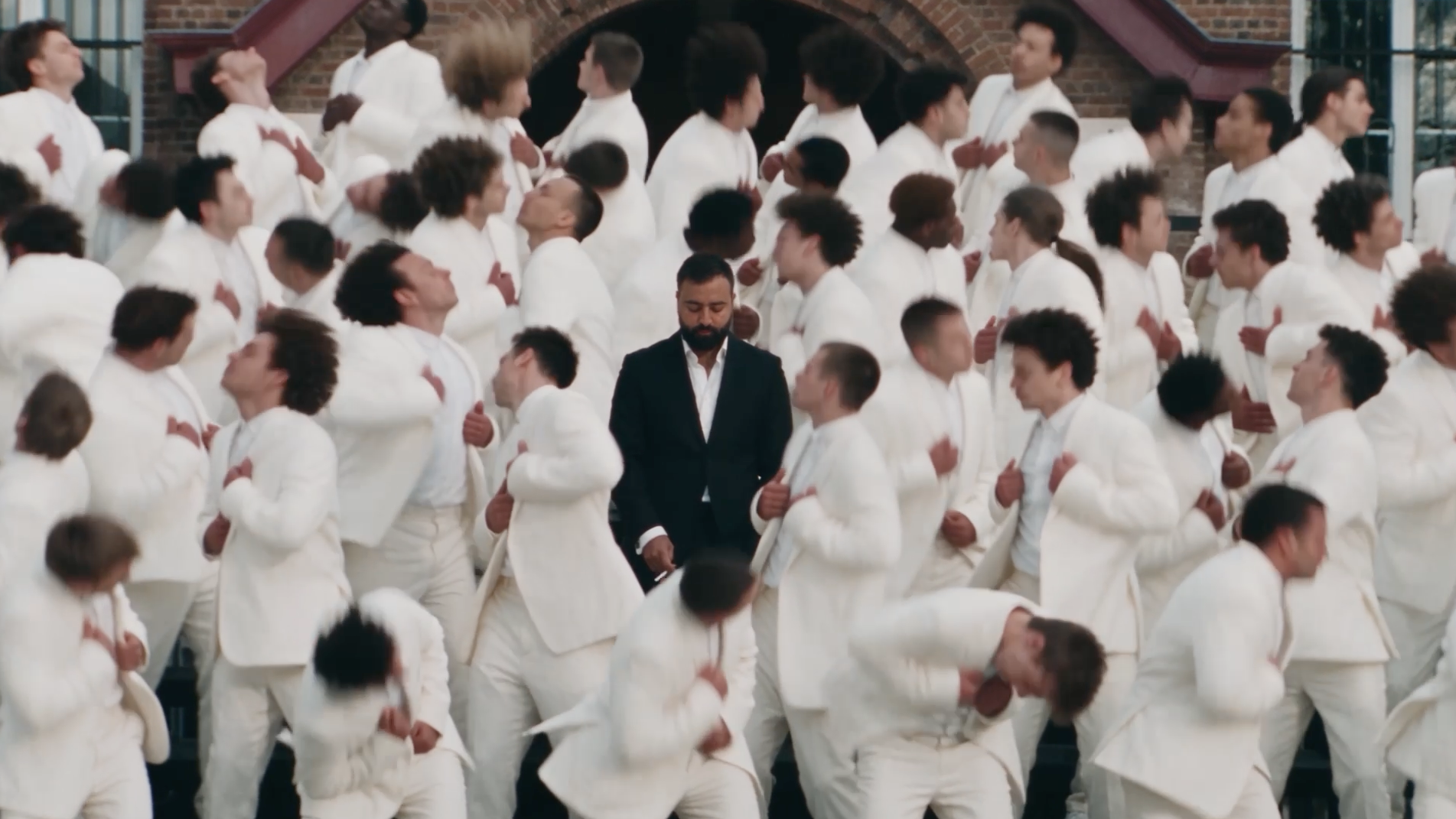
Swap yourself into a viral crowd-choreography video — one black suit at the center, an entire crowd in white moving around you. Seedance 2.5 locks your face and copies every beat.
Seedance 2.5Character SheetVideo-To-Video Swap6 StepsStorm II TrendSeedance 2.5Character SheetVideo-To-Video Swap6 StepsStorm II Trend
Overview
THE CONCEPT
This is the Storm II trend: take a reference video with tight choreography and a big animated crowd, then replace the lead with your own character and re-dress the entire background in matching white suits. You'll run it inside Seedance 2.5, feeding it a character sheet for identity and the reference clip for motion. One long, surgical prompt does the heavy lifting — it holds your face across close-ups and wide shots while faithfully reproducing the camera travel, timing, and crowd movement. Finish it with the Storm II track and you've got a scroll-stopping performance clip.
The Workflow
SIX STEPS
01
Setup · Pick Your Tool
OPEN SEEDANCE 2.5
Go to your preferred platform running Seedance 2.5. This workflow leans on its video-to-video reference control, so make sure you're on the 2.5 model before you start uploading anything.
02
Identity · Build The Face
CREATE YOUR CHARACTER SHEET
Create or upload your character sheet — this becomes Image 2, the exact identity and wardrobe reference. Use a clean, well-lit shot that clearly shows facial structure, hairstyle, facial hair, and body proportions so the model can hold your likeness across every angle.
03
Reference · Feed The Motion
UPLOAD THE VIDEO REFERENCE
Upload the Storm II reference video as Video 1. This drives the entire scene — choreography, camera movement, pacing, framing, and atmosphere. Reference clip: https://drive.google.com/file/d/1J2_DQHQMzKA9we0Cdm9uOkLRzlTsxtjW/view?usp=sharing
04
Prompt · The Swap
PASTE THE MASTER PROMPT
Paste the full prompt below. It tells Seedance to treat Video 1 as the motion source and Image 2 as the identity, then handles the black-suit lead, the white-suit crowd, camera matching, and all the realism guardrails in one pass.
Seedance 2.5 Prompt — Storm II Swap
Use Video 1 as the primary reference for the complete scene, choreography, camera movement, pacing, framing, and visual atmosphere. Use Image 2 as the exact identity and wardrobe reference for the replacement main character. Recreate the reference sequence with two controlled changes: replace the lead with the character from Image 2 wearing a black suit, and replace every background audience member with a distinct person wearing a white suit.
MAIN CHARACTER — IDENTITY LOCK: Preserve the exact facial structure, hairstyle, facial hair, skin tone, and body proportions of the character in Image 2. Maintain his recognizable identity consistently in close-ups, profiles, rear views, and wide shots. Dress him in an elegant, tailored black suit throughout, matching Image 2 wherever visible. Preserve realistic fabric texture, lapels, seams, natural folds, and movement. Do not transfer the original performer’s face, hairstyle, tattoos, or white-shirt outfit onto the replacement character.
REFERENCE CHOREOGRAPHY: Follow Video 1’s action sequence precisely: the initial close framing and hand gestures, the lead turning away from the camera, moving toward the assembled crowd, taking his central position, and the transition into energetic crowd movement surrounding him. Match his posture, gaze direction, walking rhythm, turns, gestures, and performance timing to the original. Retain the reference’s contrast between the composed central figure and the surrounding group’s animated movement.
BACKGROUND CROWD: Replace all original audience members with varied, photorealistic adults with distinct faces, hairstyles, and natural differences in appearance. Every background person wears a crisp, tailored white suit with a white shirt. Preserve the original crowd size, row arrangement, spacing, depth, and position of each person. Reproduce each person’s corresponding choreography and timing from Video 1, including the coordinated bending and energetic movement in the later sequence. Maintain individual identities throughout; no duplicated faces, disappearing people, or changing outfits. White fabric must retain visible texture and shadow detail without blown-out highlights.
CAMERA AND ENVIRONMENT: Match the original progression from close framing to the wider group composition, reproducing camera travel, lens perspective, focus transitions, shot timing, and any existing cuts. Preserve the outdoor architectural setting, steps, brick facade, windows, and background geometry from Video 1. Keep the lead’s black suit clearly distinguishable against the surrounding white suits.
REALISM AND FINISH: High-end cinematic photorealism, detailed skin, accurate anatomy, believable body mechanics, natural suit movement, realistic contact shadows, consistent daylight, and the reference’s restrained cinematic grading. Integrate every replacement seamlessly into the original lighting, perspective, depth of field, and motion blur. Maintain sharp, stable facial details wherever the reference focus allows.
STRICT CONSTRAINTS: No added choreography, extra camera moves, scene changes, surreal effects, face morphing, flickering clothing, warped hands, intersecting bodies, floating feet, or crowd duplication. No added text, logos, or watermarks. The result should closely reproduce Video 1’s staging and performance, with the Image 2 character in black as the central visual focus and the entire surrounding crowd dressed in white.
05
Render · Make It Move
GENERATE
Run the generation. Review the output for identity drift, duplicated crowd faces, or blown-out white suits — if anything slips, regenerate before moving on to sound.
06
Finish · Add Sound
DROP THE STORM II TRACK
Bring your clip into an editor and lay the Storm II track over it. Line up the crowd's energetic movement and the beat drop so the choreography hits with the music for maximum impact.
Pro Notes
PUSH IT FURTHER
🎯
Identity
USE A CLEAN CHARACTER SHEET
Your Image 2 reference decides how well the face survives close-ups and wide shots. Front-lit, sharp, and neutral beats a moody hero shot every time.
🤍
Crowd
WATCH THE WHITE SUITS
White fabric loves to blow out. Check the render for texture and shadow detail on the crowd — flat white blobs kill the cinematic feel.
🎬
Motion
LET THE REFERENCE DRIVE
Don't ask for extra camera moves or new choreography. The trend works because it reproduces Video 1 exactly — your only changes are the lead and the wardrobe.
🎵
Timing
SYNC THE BEAT DROP
Align the transition into energetic crowd movement with the Storm II drop. That single sync point is what makes the clip feel intentional instead of edited.