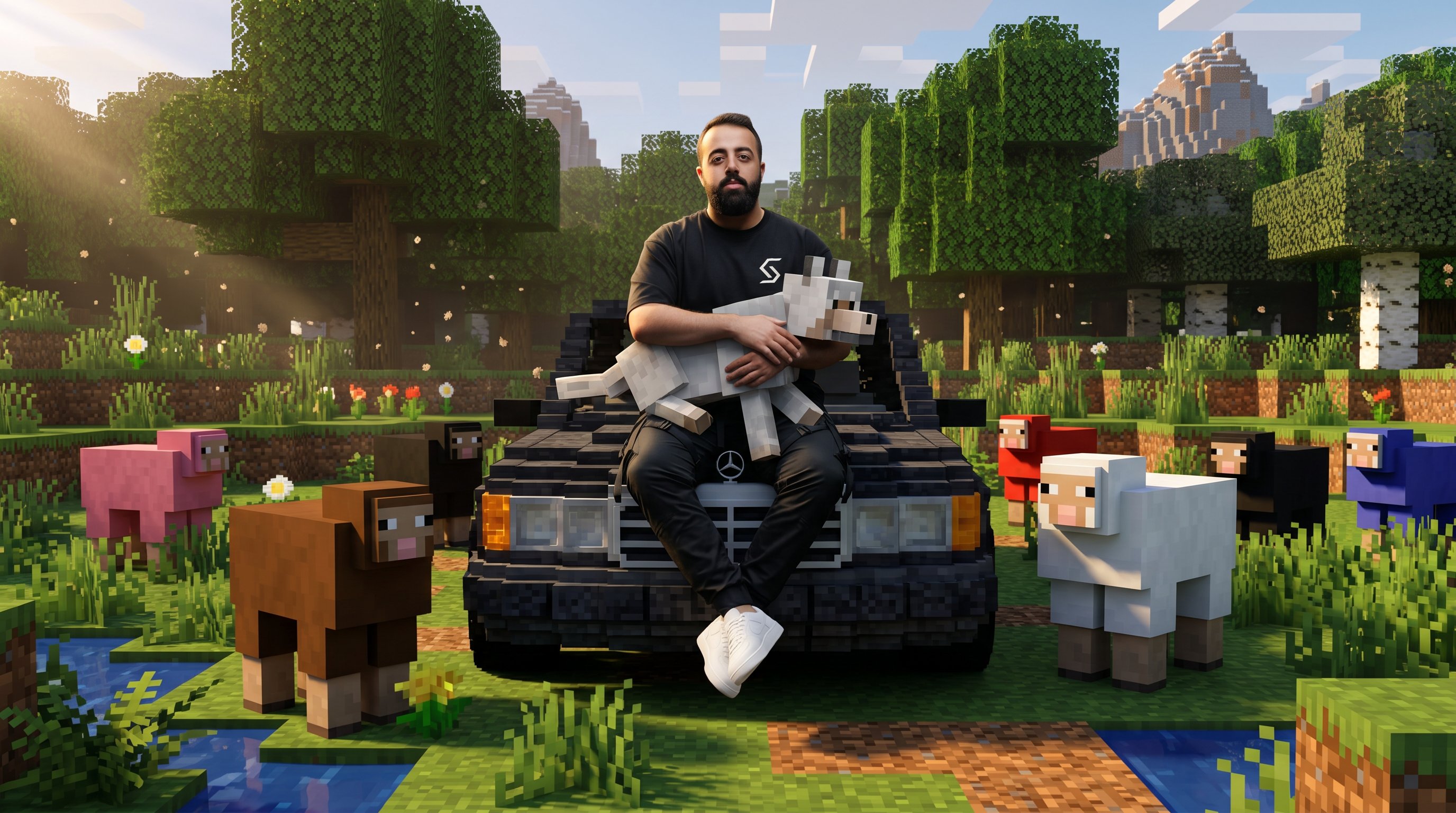
Drop any real-life photo into Nano Banana 2 and step into a cinematic, RTX-shader Minecraft world — voxel trees, blocky terrain, sheep and wolves replacing pets and props — while your face, pose, clothing, and the camera angle stay exactly as they were. Two prompt options included.
An image-to-image transformation that takes any real-life photo — a forest hike, a city shot, a mountain pose, a beach moment, a portrait with your dog — and rebuilds the entire environment as a cinematic Minecraft RTX scene. Voxel trees, blocky terrain, pixelated water, sheep and wolves replacing pets and props. The catch: you stay photoreal. Your face, clothing, pose, and the camera angle don't change. The world goes Minecraft, but you stay you. Two prompt versions below — a structured JSON brief and a normal prose version. Pick whichever your platform handles better.
The Workflow
THREE STEPS
01
Setup · Open The Model
GO TO NANO BANANA 2
Open your preferred platform with access to the Nano Banana 2 image model. It's the model behind this transformation — it handles image-to-image edits that need to rebuild an entire environment while keeping the subject locked in pose, proportions, and identity. Pick the platform you already use (Higgsfield, fal.ai, or any AI studio that hosts Nano Banana 2) and start a fresh image edit.
Open a platform with Nano Banana 2
Start a new image edit / generation
Make sure image-to-image is enabled
02
Input · Any Real-Life Photo
UPLOAD YOUR IMAGE
Upload any real-life photo as the base image. The prompt works best on outdoor and lifestyle shots — travel photos, mountain hikes, forest walks, lake or beach scenes, city moments, streetwear poses, portraits with a pet — anywhere the world around you has enough texture and depth to be reimagined as Minecraft terrain. Sharp, well-lit, cinematic photos give the cleanest voxel rebuild.
Pick any real-life photo
Outdoor / travel shots work best
Prefer sharp, well-lit images
Upload as the base / source image
03
The Brief · Two Options
PASTE THE PROMPT & ENJOY :)
Pick one of the two prompts below and paste it into Nano Banana 2 — you don't need both. Option 1 is a structured JSON brief that some platforms handle very well. Option 2 is the same brief rewritten as natural prose for platforms that prefer flowing language. Try Option 1 first; if your render goes off, switch to Option 2.
Option 1 — JSON Prompt
{ "task": "image_transformation", "style": { "overall_aesthetic": "High-quality cinematic Minecraft screenshot.", "rendering_technique": "Mixed-media: Photorealistic subject embedded in a voxel-based environment." }, "subject_rules": { "main_subject": "The human person from the reference image must remain completely photorealistic and unchanged. No pixelation or block filters on their body, clothing, or face.", "interacting_objects": "CRITICAL: Any non-human object in direct physical contact with the subject e.g. or nearby pets dogs MUST be converted into Minecraft block models or mobs. A real dog becomes a Minecraft wolf." }, "environment_rules": { "background_analysis": "Analyze the reference image background structure and recreate it entirely out of Minecraft voxel blocks.", "elements": "Trees, terrain, paths, and foliage must be cubic blocks with pixel art textures.", "atmosphere": "Replicate the foggy forest atmosphere using blocky volumetric fog layers appropriate for Minecraft." }, "composition_and_lighting": { "camera": "Maintain the exact camera angle and framing from the reference photo.", "lighting": "Minecraft daylight with gentle haze and consistent block-based shadows." } } enhance
Option 2 — Normal Prompt
High-quality cinematic Minecraft-style image transformation. Convert the entire uploaded image into a realistic Minecraft-inspired world while preserving the exact original composition, framing, camera angle, zoom level, crop, subject placement, body proportions, pose, perspective, and overall scene layout from the uploaded photo.
CRITICAL: Do NOT change the image aspect ratio, image dimensions, framing, crop, zoom level, subject scale, or camera distance. The transformed image must match the original image composition exactly.
Transform the environment into a fully Minecraft-inspired voxel world:
• terrain becomes cubic Minecraft blocks
• trees become blocky voxel trees
• water becomes pixelated Minecraft water
• rocks, mountains, roads, grass, clouds, and foliage become Minecraft-style blocks
• lighting and shadows should feel like realistic Minecraft shaders
• maintain environmental depth and atmosphere from the original image
The human subject should remain highly recognizable with the same:
• pose
• clothing structure
• facial direction
• hairstyle silhouette
• body positioning
• proportions
• perspective
BUT convert the person into a realistic cinematic Minecraft-style character:
• Minecraft-inspired block geometry
• voxel-textured clothing
• realistic shader rendering
• smooth cinematic Minecraft lighting
• game-like realism similar to ultra-realistic Minecraft RTX gameplay
Keep the image looking immersive, cinematic, and ultra detailed — like a high-end Minecraft gameplay screenshot with realistic shaders and volumetric lighting.
Include:
• realistic Minecraft RTX lighting
• cinematic fog and atmospheric depth
• voxel shadows
• block-textured terrain
• realistic reflections if water is present
• realistic Minecraft-style environmental rendering
• ultra detailed cinematic shader effects
• authentic Minecraft visual identity
The final image should feel like:
• a real photograph transformed directly into a cinematic Minecraft universe
• realistic Minecraft gameplay
• ultra detailed voxel world rendering
• stylized but believable game realism
The final output must preserve the exact original image structure while transforming the entire scene into a realistic cinematic Minecraft world.
Pick Option 1 (JSON) or Option 2 (Prose)
Paste the full prompt unchanged
Generate & run a few variations
Export the final image
Pro Tips
PUSH IT FURTHER
🌲
Photo Choice
PICK A SCENE WITH DEPTH
Photos with rich natural environments — forests, mountains, lakes, parks, beaches — Minecraft-ify the best, because the model has terrain, trees, water, and sky to rebuild as voxels. Indoor portraits with plain backgrounds give the model less to work with, so the transformation looks flatter. Outdoor cinematic shots with foreground, midground, and background hit hardest.
🧱
Subject Rules
YOU STAY PHOTOREAL
The prompts explicitly say: the human stays photoreal, only the world becomes Minecraft. If a render pixelates your face or clothes, that's the model overshooting — regenerate or re-emphasize the "subject must remain photorealistic" rule. Pets and props are different — those should become Minecraft mobs (a dog becomes a wolf, a sheep becomes a sheep).
🔀
JSON vs Prose
TRY BOTH OPTIONS
Same brief, two formats. Some Nano Banana 2 platforms parse JSON beautifully and lock onto the explicit rules; others get confused by the brackets and prefer the prose version. If Option 1 misses the mark, try Option 2 with the exact same input image — you'll often get a noticeably different result without changing anything else.
✨
RTX Look
PUSH THE SHADERS
The prompts already ask for cinematic RTX-style lighting and volumetric fog — that's the difference between a flat Minecraft cartoon and a screenshot that looks like premium gameplay. If a render comes back too flat, regenerate or add a phrase like "high-end RTX shader pack, volumetric god rays, soft global illumination" near the end.