The Workflow
TWO STEPS
01
Screenshot · Image Generation
GRAB THE BROADCAST FRAME
Go to YouTube, a sports streaming platform, or any live TV broadcast covering a sports event. Find an in-game shot — a wide camera angle showing the stadium, fans in seats, with the broadcast overlay graphics visible (scoreboard top-left, league logo top-right). Take a screenshot of that exact frame. The real broadcast graphics are the key — they carry the authenticity of the moment.
Now open Nano Banana 2 or ChatGPT Image Generator (GPT-4o). Upload your screenshot as the background reference and also upload your photo as a character reference. Then paste this prompt:
Now open Nano Banana 2 or ChatGPT Image Generator (GPT-4o). Upload your screenshot as the background reference and also upload your photo as a character reference. Then paste this prompt:
Image Generation Prompt — Nano Banana 2 / GPT Image
Take this image, take only the graphics showing on top left and top right, leave it on screen, replace the stream image by the attached character sitting on [team name] seat, watching the game as if he's in the game next to fans, he's wearing the [jersey description], 16:9 ratio
Replace the Variables
[team name]
The team whose stadium you're placing the character in. e.g. "FC Barcelona", "Real Madrid", "Lakers", "Manchester City"
[jersey description]
The jersey your character is wearing. e.g. "FC Barcelona blue-and-garnet home jersey with Spotify logo", "Lakers purple and gold #23 jersey"
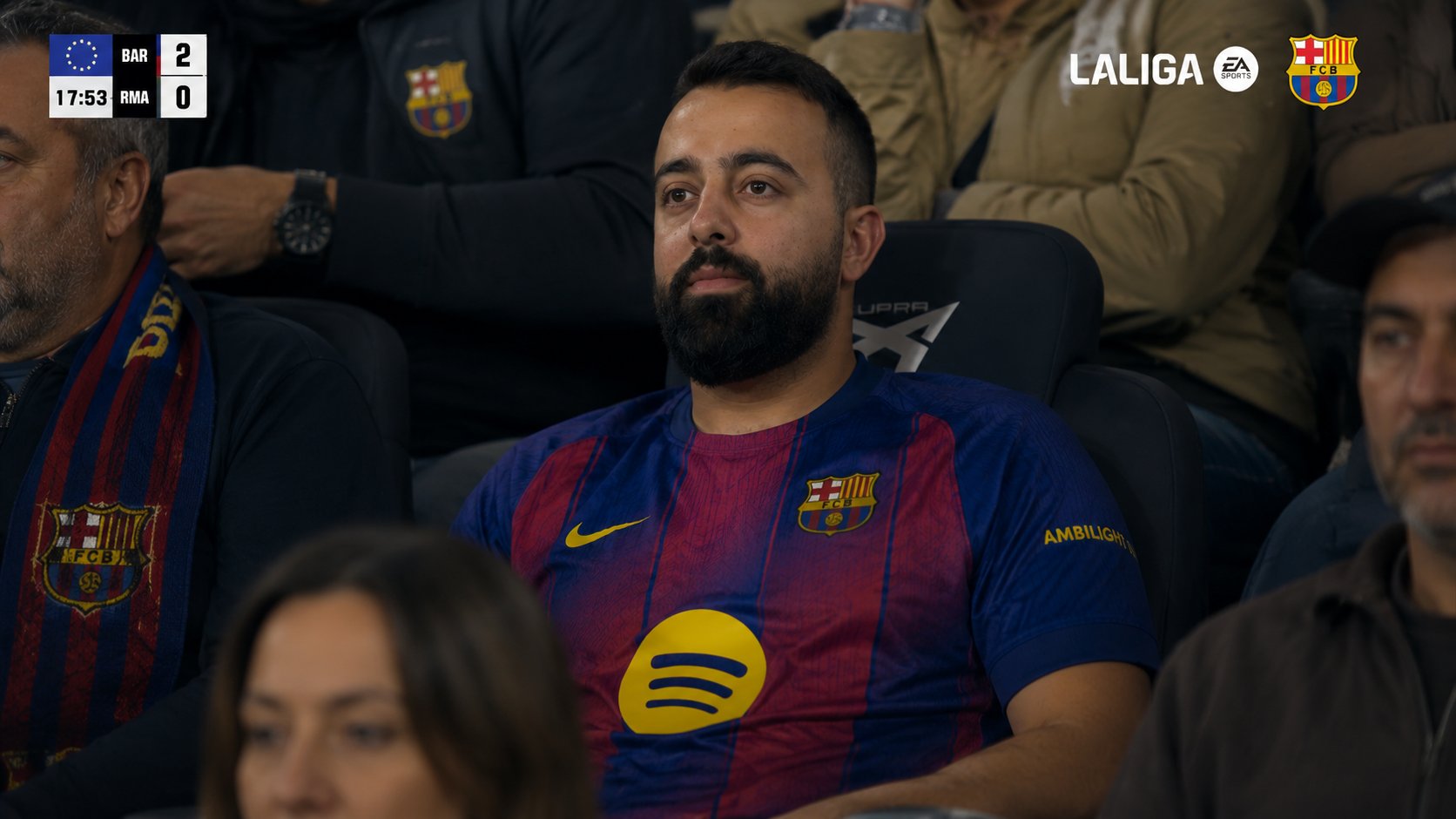
Example output — Wadih Hajj at Camp Nou, El Clásico. BAR 2–0 RMA, 17:53
Upload broadcast screenshot as background
Upload your photo as character reference
Keep original broadcast overlays intact
Output at 16:9 ratio
Verify jersey + team graphics match
Save the final image for Step 02
02
Video Animation · Seedance 2.0
ANIMATE THE MOMENT
Take the image you generated in Step 01 and bring it to Seedance 2.0 on Higgsfield. Attach the image as your primary reference and paste the prompt below. The prompt instructs Seedance to animate the scene as a live broadcast moment — the character notices the camera, smiles, waves, and the fans react around him. Adapt the character name, team, score, and commentary voiceover to your own scenario.
Seedance 2.0 Video Prompt — Full Version
Cinematic live [League Name] broadcast frame, 16:9 aspect ratio, photoreal stadium atmosphere, ultra-realistic 8K-quality video with broadcast camera aesthetic, [Team A vs Team B] at [Stadium Name].
Animate the attached image into a 10-second live-broadcast sequence:
Seconds 0–3 (Watching the Game): The character from the attached image — [Character Name], preserve his exact face, beard, hair, eyes, skin tone, and identity completely without alteration — sits in his stadium seat wearing his [jersey description], watching the match intently. Subtle natural motion — his eyes track the play on the field, his chest rises and falls with breath, his head tilts slightly following the ball. The fans around him in the soft-focus background move naturally. Atmospheric stadium energy: distant crowd murmur, faint ambient cheering, warm-and-cool stadium lighting bathing the scene. The top-left scoreboard overlay and the top-right league wordmark with team crest must remain pixel-perfect, sharp, fully legible, and fixed in their exact positions throughout the entire video, never moving or distorting.
Seconds 3–5 (Realizing He's on Camera): The character's expression shifts subtly — his eyes flicker to the side, then up, as he notices something on the giant jumbotron screen across the stadium. A flicker of recognition crosses his face. His eyebrows lift slightly. He glances directly toward the broadcast camera for a brief moment, then back up toward the jumbotron. The fans around him don't yet notice.
Seconds 5–8 (Seeing Himself, Smiling): The character's face slowly breaks into a warm, genuine, slightly embarrassed smile as he sees himself on the giant stadium jumbotron. His eyes squint with the smile, his cheeks lift. He raises one hand slightly in a humble half-wave to the camera, then settles back, grinning, shaking his head a little in disbelief. The fans around him begin to notice — the fan beside him turns and smiles, claps him on the shoulder. Subtle camera push-in tightens the framing on his face during this beat.
Seconds 8–10 (Settling Back into the Game): The character waves once more at the camera with a wider relaxed smile, then turns his attention back to the field, still smiling. The stadium ambience swells slightly. Final frame holds on his smiling profile with the iconic stadium backdrop and the preserved broadcast overlays.
AUDIO/COMMENTATOR VOICEOVER: A warm, charismatic [nationality]-accented commentator's voice, mid-game energy, shifts mid-sentence: "...and [Team A] keeping the pressure on here — oh, and look who we have in the building tonight — we have [Character Name] here at [Stadium Name] for this match, ladies and gentlemen — what a fan, what a moment — and he sees himself on the screen, look at that smile! Welcome to [Stadium Name], my friend!" Background audio: crowd murmur, distant cheering, faint ambient stadium roar.
LOCKED ELEMENTS: The character's face and identity from the attached image — fully preserved. The jersey design. The broadcast overlay graphics top-left and top-right. The 16:9 broadcast aspect ratio. The stadium environment. Only natural micro-expressions, head movement, smile, and subtle fan reactions should animate — everything else must remain locked and pixel-faithful throughout.
Settings: 1080p · 10 seconds · 16:9 · Medium motion · 24fps · Photoreal cinematic broadcast
Customize These Variables
[League Name]
LaLiga, Champions League, NBA, Premier League, etc.
[Team A vs Team B]
The two teams playing. e.g. "FC Barcelona vs Real Madrid"
[Stadium Name]
e.g. "Spotify Camp Nou", "Madison Square Garden", "Wembley Stadium"
[Character Name]
The person's full name for the commentator voiceover
[jersey description]
Full jersey description including colors, logos, sponsor
[nationality]
Commentator accent — e.g. "Spanish", "British", "American"
Attach Step 01 image as primary reference
Set resolution to 1080p
Duration: 10 seconds
Aspect ratio: 16:9
Motion intensity: Medium
Frame rate: 24fps