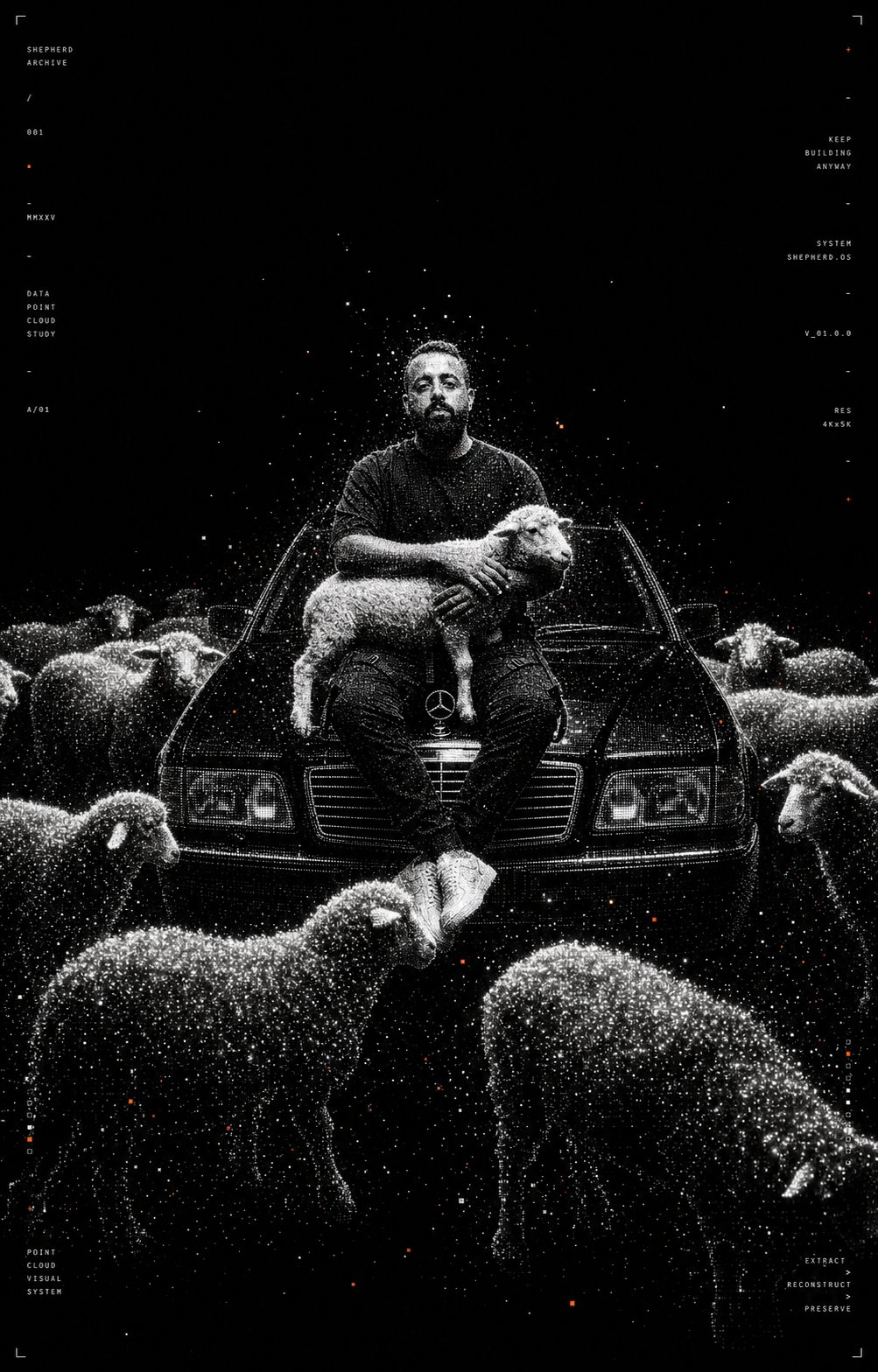
Turn any photo into a high-contrast monochrome particle render — your subject reconstructed entirely from thousands of glowing white dots on pure black, with tiny orange accents and minimal mono typography. Brutalist, futuristic, point-cloud aesthetic. One prompt, one paste, instant generative-art poster.
An image-to-image stylization that takes any photo — portrait, lifestyle shot, product, animal, scene — and rebuilds it as a point-cloud particle render. The subject dissolves into thousands of glowing white dots on pure black, with sparse orange accent particles drifting around the edges and minimal mono-spaced typography on the sides like a futuristic design poster. Cinematic negative space, voxel-style dispersion, halftone density gradients. The hero above is the workflow applied to a portrait with a Mercedes and sheep — pure dot-particle aesthetic, recognizable silhouette, zero realistic textures.
The Workflow
THREE STEPS
01
Setup · Open The Model
GO TO NANO BANANA 2
Open your preferred platform with access to the Nano Banana 2 image model. It's the model behind this aesthetic — it handles image-to-image stylizations exceptionally well, especially heavy artistic transformations like dot-particle renders, while still preserving the subject's silhouette and composition. Pick the platform you already use (Higgsfield, fal.ai, or any AI studio that hosts Nano Banana 2) and start a fresh image edit.
Open a platform with Nano Banana 2
Start a new image edit / generation
Make sure image-to-image is enabled
02
Input · Any Photo
UPLOAD YOUR IMAGE
Upload any photo as the base image. The dots effect works on virtually anything — portraits, lifestyle shots, animals, products, scenes — but the strongest results come from images with a clear, isolated subject and a relatively simple background. The model rebuilds the silhouette from white particles, so the cleaner the subject reads in the source, the cleaner the dot-render reads in the output.
Pick a photo with a clear subject
Prefer sharp, well-lit images
Simple backgrounds work best
Upload as the base / source image
03
The Brief · Full Prompt
PASTE THE PROMPT & ENJOY :)
Paste the full prompt below into Nano Banana 2 exactly as written and hit generate. It locks in the entire aesthetic — point-cloud dispersion, halftone density, tiny orange accent particles, mono-spaced poster typography, brutalist futurism — and the negative prompt at the bottom keeps the model from drifting into realistic shading or colorful backgrounds. Keep it intact, run a few passes, pick the strongest one, done.
Nano Banana 2 Prompt — Full Brief
Transform the uploaded image into a high-contrast monochrome particle-render aesthetic. Subject reconstructed entirely from thousands of tiny glowing white dots and voxel-like particles on a pure black background. Use point-cloud dispersion, volumetric particles, halftone density gradients, and scattered noise trails to define the silhouette. Preserve the original subject composition and pose, but simplify details into clean geometric forms. Style should feel like futuristic AI architecture visualization mixed with experimental generative art.
Visual characteristics:
• black background only
• white particle clusters forming the subject
• subtle floating debris and dissolving particles around edges
• sparse orange/red accent particles (very minimal)
• cinematic negative space
• ultra minimal
• soft bloom glow on dense particle areas
• depth created through particle density
• abstract but recognizable silhouette
• no realistic textures
• no colors besides black, white, and tiny orange accents
• brutalist futuristic design aesthetic
• clean composition
• vertical poster layout
• slight voxel / point-cloud rendering effect
• high contrast
• generative AI art style
• experimental architecture visualization aesthetic
Typography treatment: small thin mono-space typography placed minimally on left and right sides, similar to futuristic design posters, white text only, subtle and secondary to the artwork
Rendering style: octane render, point cloud simulation, particle system render, volumetric dispersion, procedural dots, cinematic lighting, ultra detailed, abstract minimalism
Negative prompt: realistic shading, painterly textures, colorful backgrounds, low contrast, photorealism, messy composition, extra objects, blur, noisy artifacts, low resolution
Paste the full prompt unchanged
Keep the negative prompt at the end
Generate & run a few passes
Export the final poster
Pro Tips
PUSH IT FURTHER
🖤
Subject Isolation
CLEAN SILHOUETTE FIRST
The dot render only reads if the subject silhouette is clean. Source photos with busy backgrounds, low contrast between subject and surroundings, or cluttered foregrounds make the particles smear into mush. Portraits, lifestyle shots with one clear subject, or products on plain backdrops all hit hardest. If your source is busy, mask the subject or remove the background first.
🚫
Negative Prompt
KEEP THE EXCLUSIONS
The "Negative prompt" block at the end of the brief is what stops Nano Banana 2 from sneaking in painterly textures, photorealism, or color washes. Don't trim it — that line does more work than most users realize. If a render comes back too soft, too colorful, or too realistic, re-emphasize the negative prompt rather than rewriting the rest.
🟠
Orange Accents
SPARSE, NOT SPRINKLED
The tiny orange/red accent particles are what make this aesthetic feel intentional, not monochrome by accident. The prompt says very minimal for a reason — if your render comes back with too many orange dots, edit "sparse orange/red accent particles" to "extremely rare orange accent particles, less than 1 percent" and regenerate. Restraint is the whole look.
📐
Mono Typography
EMBRACE THE POSTER
The thin mono-space side typography is part of the aesthetic, not an accident — it grounds the piece as a "designed object" rather than just an AI render. If the model omits it on the first pass, regenerate and re-emphasize the "Typography treatment" line. The text doesn't need to be readable or meaningful; the visual pattern of typography on the edges is what matters.